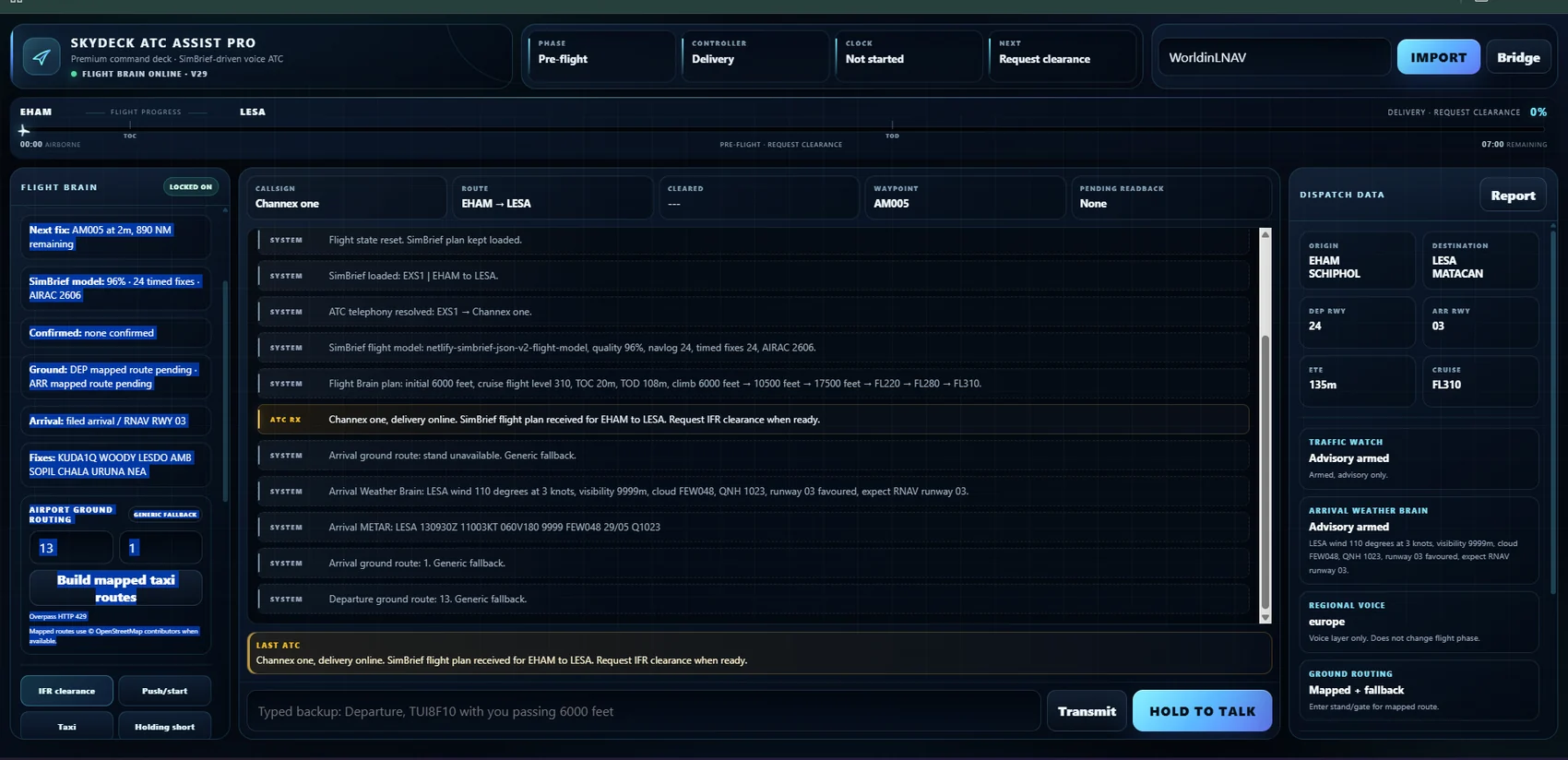
Voice ATC
Natural push-to-talk requests, readbacks, clearances, handoffs, holds and operational questions.
Premium voice ATC, cabin realism and Live Network radio for Microsoft Flight Simulator pilots on Xbox and PlayStation. Import SimBrief, hold to talk, fly gate-to-gate, and connect to Pilot Network when you want the frequency to come alive.
Connect with other SkyDeck pilots, share real pilot voice and let SkyDeck ATC responses play across the room when you are connected. It gives console sim flying a premium radio layer without handing control of your flight to the crowd.
SkyDeck is designed for MSFS pilots flying from Xbox or PlayStation with a companion device beside them. It uses SimBrief, your voice and your live pilot reports to create a guarded flow that feels operational without pretending console telemetry exists.
SkyDeck is built as a full cockpit companion, not a loose stack of buttons. Every feature is designed to keep the flight believable, guarded and easy to use while you fly the aircraft.
Natural push-to-talk requests, readbacks, clearances, handoffs, holds and operational questions.
Route, procedures, cruise, timings and planned descent context shape the flight.
Clearance, push, taxi, takeoff, climb, cruise, descent, approach, landing and taxi-in stay connected.
Pilot Network rooms, nearby pilots, presence, shared ATC responses and real mic sharing when connected.
Busy state, cooldown logic and clear room status help prevent double transmissions.
Stand-to-runway and runway-to-stand routes use mapped airport geometry where available.
Supportive callouts, workload cues, TOD prompts and flight-deck companionship.
Cabin manager, service flow, boarding, arrival, chimes, announcements and airline-style atmosphere.
Desktop, phone and tablet views designed around real cockpit workload and console flying.
SkyDeck is currently in controlled beta while the public launch runway is prepared. Start with a free 24-hour trial through Stripe checkout, or use a tester access code if you are part of the private beta.
One clear monthly plan keeps the setup simple while selected testers continue validating the product before wider release.
SkyDeck is being validated through real console flights before wider release.
No simulator plug-in, no PC-only setup, no pretend console telemetry.
Clearances, handoffs and readbacks stay inside a guarded operating flow.
See how a SimBrief plan becomes a spoken gate-to-gate sequence, with natural push-to-talk, mapped ground routing and a protected operating flow that remembers what has actually been cleared.
These are live SkyDeck interactions from a complete test flight. Start with the music-backed highlights film, then choose any full exchange from the chapter deck.
A music-backed showcase of clearance, mapped taxi, takeoff, conversational ATC and landing.
A full Seattle to Portland flight put SkyDeck through a real gate-to-gate sequence. The system used SimBrief descent planning, waited for pilot evidence, protected the terminal phase and completed the flight through Approach, Tower and mapped taxi to stand.
The aircraft reported near KRATR at 12,500 feet. SkyDeck confirmed the route-linked gate and issued the next planned level, rather than silently assuming the aircraft had descended.
The Flight Brain progressed from KRATR at 12,000 feet to BOOSR at 6,500 feet, then waited for the Approach-entry conditions before going lower.
SkyDeck transferred to Approach, continued via the KRATR3 arrival and BUWZO transition, then issued 4,000 feet and later 3,000 feet until established.
Runway 28L, Ground on 121.700 and a high-confidence route to stand D10 completed the test without reopening departure logic.
SkyDeck is still in private beta. Test flights like this help prove the system across different aircraft, airports and real console setups before wider public access.
Apply to test SkyDeckChoose an airline style and let SkyDeck build route-aware announcements from the SimBrief plan. Original cabin music, gentle chimes and phase-aware announcements sit alongside guarded cabin-crew intercom requests and low-workload cruise information.
While the protected Flight Brain keeps authority over ATC, SkyDeck can now surround the flight with optional advisory layers: a right-seat monitor, airline style packs, ground crew flow and a cleaner preflight briefing desk.
Phase-aware checklist prompts and optional spoken right-seat briefs sit beside ATC without ever changing a clearance, handoff or route decision.
Auto mode can infer the operating style from SimBrief and cabin context, shaping briefing tone, right-seat hints and turnaround presentation.
Spoken ramp updates for boarding, doors, tug, push readiness, ramp clear, arrival stand and parking give the flight a living airport feel.
A SimBrief-aware operational summary turns route, runway, cruise, descent and stand information into a clean preflight brief.
SkyDeck is not a pile of loose buttons. The ATC channel, SimBrief plan, ground routing, cabin layer and pilot reports all feed one protected operating sequence.
IFR clearance, pushback, taxi, hold short, takeoff, climb, cruise, descent, approach, Tower, landing and taxi-in remain one protected chain of authority.
Speak aviation naturally. SkyDeck understands readbacks, altitude reports, TOD calls, approach requests, frequencies, operational questions and emergencies.
Route, procedures, cruise, timings, waypoints, fuel, weather and navigation data shape the planned flight.
Stand-to-runway and runway-to-stand routes use mapped airport geometry where coverage permits, with visible confidence.
Tune active and standby frequencies, use rapid direct entry or accelerated controls, transfer the channel and complete controller handoffs before the Flight Brain accepts your next check-in.
Request weather, runway information, vectors, frequencies, bird reports, approach changes or altitude amendments. Operational readbacks always outrank conversational questions, and vector arrivals now progress from pilot check-in and intercept evidence rather than timer assumptions.
Exact SimBrief TOD stays locked until live pilot evidence, while the progress strip, countdown and next-fix display share one authoritative flight clock.
Conversational AI is useful only when it cannot casually rewrite the flight. SkyDeck separates interpretation from authority, preserving the exact phase, clearance and pending readback unless the protected Flight Brain approves a change.
Load the current SimBrief plan and build the route, climb, cruise, timing and arrival model.
Enter stand or gate details, build mapped taxi routes and review expected weather and approach.
Transmit to ATC and work the frequency naturally, with readbacks and operational questions handled in context.
Tell SkyDeck what the aircraft is actually doing so the honest clock and Flight Brain follow the live flight.
SkyDeck does not claim to receive live aircraft position or simulator-state telemetry directly from a PS5 or Xbox. It combines the SimBrief plan, an honest flight clock and your spoken reports, then shows that limitation clearly rather than hiding it behind a fake radar screen.
SkyDeck Membership is the main paid launch route: £6.99 per month with a free 24-hour trial, handled securely by Stripe. During controlled beta, selected testers can still use access codes while the public experience is polished.
SkyDeck is selecting console pilots for structured real-flight testing. The goal is simple: complete gate-to-gate flights, report anything confusing, and help prove the experience across aircraft, routes, phones and tablets.
Selected test pilots can enter their individual access code here. New applicants should use the form above.
Tester loginNo. SkyDeck runs beside the simulator and uses SimBrief, an honest timing model and your spoken reports rather than claiming direct console telemetry.
A modern phone, tablet or laptop with a microphone and current browser. HTTPS is required for microphone access.
No. It uses mapped airport geometry and a confidence system. Temporary closures, local procedures and live Ground instructions may differ.
The private beta allows reliability, operating cost and unusual flight scenarios to be measured before wider subscriptions or entitlements open.
No. SkyDeck is an entertainment and flight-simulation companion. It must never be used for real-world aviation navigation, instruction or operational decision-making.
The protected shell is designed to evolve into proper per-user authentication, access levels, usage quotas and subscription entitlements.